
24th May 2026
Walkie Talkie Won't Charge? 5 Quick Fixes for Batteries, Docks & Cables

Technical Diagnosis | Battery & Charging Repair | 2026 Edition
Picture this: It is the night before a massive weekend airsoft tournament, a vital security shift, or a multi-day hike across the Scottish Highlands. You drop your trusty Baofeng radio into its charging dock, expecting the reassuring red light to indicate it's drawing power. Instead, the dock light blinks erratically, stays green, or worse—doesn't light up at all. When your walkie-talkie won’t charge, your entire communication lifeline is cut off.
Whether you are an outdoor enthusiast relying on weather updates or a professional coordinating a busy event, a dead two-way radio is a critical failure. Fortunately, a walkie-talkie that refuses to charge rarely means the radio itself is broken. In most cases, the culprit is an aging battery, a dirty contact point, or a faulty docking station.
Here is our expert guide to diagnosing and fixing a two-way radio that refuses to charge.
Table of Contents
Quick Troubleshooting Checklist
If you are in a rush to get your radio working, check these four things immediately:
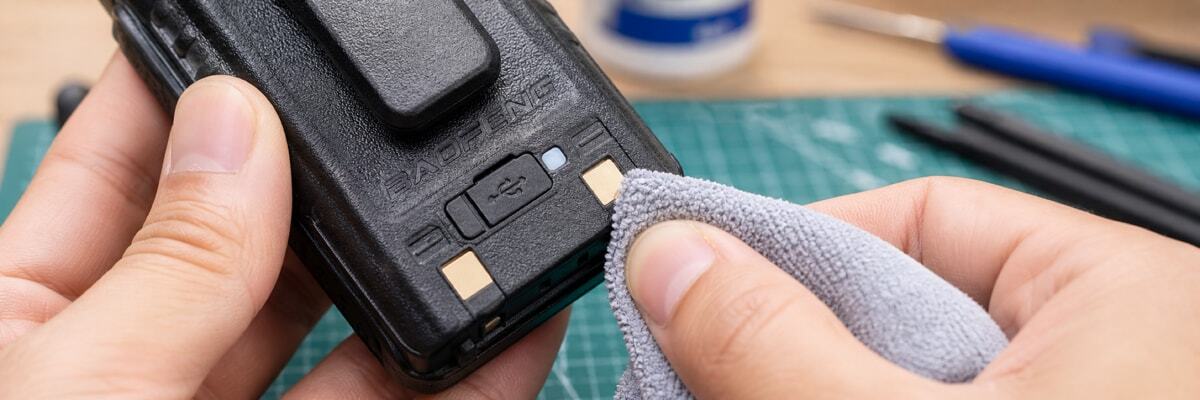
- Clean the Contacts: Wipe the metal plates on the back of the battery and the prongs in the charging dock with a dry microfiber cloth or a pencil eraser.
- Check the Seating: Ensure the radio is sitting flush in the desktop charger. Sometimes the radio leans forward, breaking the electrical connection.
- Inspect the Plug: Ensure the AC adapter is firmly plugged into the wall and the barrel connector is pushed completely into the back of the charging dock.
- Age of the Battery: If your Lithium-ion (Li-ion) battery is over 2-3 years old or has been left completely flat for months, it may have entered "deep discharge" and needs to be replaced.
Why Your Walkie Talkie Battery Isn't Charging
To understand how to fix the problem, you need to understand how the power ecosystem of a two-way radio works. Modern radios, like the Baofeng UV-5R series, rely on Li-ion batteries, specialized desktop charging drop-in trays, and AC wall adapters. A failure at any of these points breaks the circuit.
1. Dirty or Corroded Charging Contacts
Over time, taking your radio into the field exposes it to dust, moisture, and mud. This debris accumulates on the metal contact points of both the battery and the charging tray.
2. Deep Battery Discharge (The "Dead" Battery)
Lithium-ion batteries require a tiny bit of residual power to manage the charging process. If you leave your walkie-talkie sitting in a drawer for a year with a dead battery, it can slip into a state called "deep discharge."
3. Faulty Desktop Dock or AC Adapter
Sometimes, the battery is perfectly fine, but the dock has failed. Desktop chargers are relatively simple devices, but internal soldering can break if the dock is dropped.
4. Damaged Charging Cables & Ports
Newer walkie-talkies are moving away from proprietary desktop docks toward modern USB Type-C charging (such as the Baofeng UV-5RH).
Step-by-Step Troubleshooting Guide for Two-Way Radios
Follow these steps to isolate the hardware issue and get your comms back online safely.
Step 1: The Visual Inspection and Clean
Turn off the radio and detach the battery. Inspect the battery for any signs of physical swelling or warping. If a Li-ion battery is swollen, do not attempt to charge it—dispose of it safely at a recycling centre immediately.
Step 2: Decode the Charger Dock Lights
Your desktop charger is trying to tell you what is wrong. While brands vary, Baofeng docks generally follow this pattern:
- Solid Green: The battery is fully charged (or the dock cannot detect the battery).
- Solid Red: The battery is actively charging normally.
- Flashing Red/Green: The dock is detecting an error (e.g., dirty contacts).
Step 3: The Swap Test
The fastest way to find the broken component is the process of elimination. If you have a friend with the same radio, or you own a multi-pack bundle, swap batteries to see if the issue follows the battery or the dock.
Step 4: Multimeter Voltage Check (Advanced)
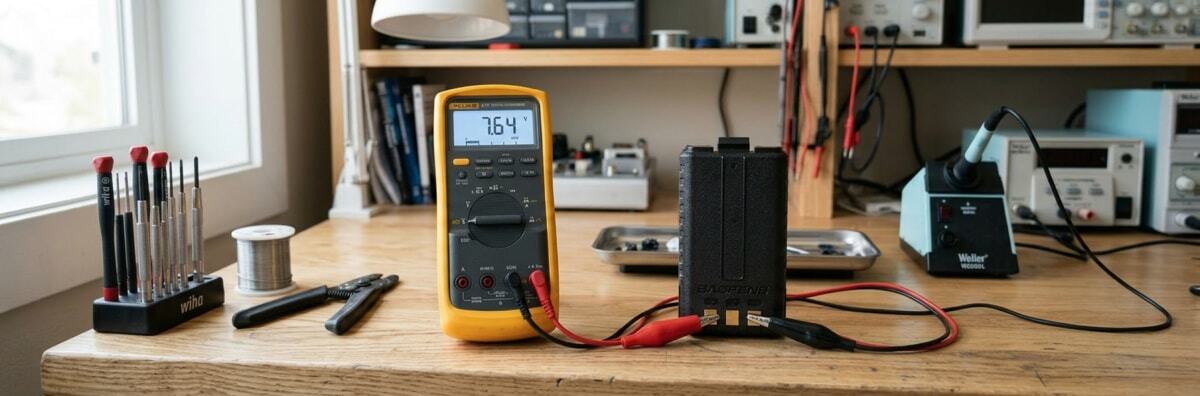
If you have a digital multimeter, you can diagnose the issue like a professional. A healthy, fully charged Baofeng battery should read about 8.4V.
UK Buyer's Note: Counterfeit Batteries and Voltage Mismatches
For our UK users, a common reason for charging failure is buying cheap, counterfeit replacement batteries from unverified overseas sellers. Always purchase authentic, UK-compliant radios and accessories from trusted domestic suppliers.
Frequently Asked Questions (FAQs)
1. Can you overcharge a walkie-talkie battery?
Most modern, authentic desktop chargers have "smart" circuits that stop providing current once the battery reaches 100%.
2. What does a blinking red light on the Baofeng charger mean?
A blinking red and green light usually indicates a fault, such as dirty contacts or a battery not seated properly.
3. How do I fix a deeply discharged Li-Ion battery?
For safety reasons, you should not try to "jump-start" a deeply discharged lithium-ion battery. The safest solution is to purchase a new replacement.
4. Can I use a different brand's charger dock?
No. Even if your radio fits into another brand's dock, never mix them. Different radios use different voltages.
5. Why is my radio battery getting hot while charging?
It is normal for a battery to get slightly warm, but if it becomes painfully hot or smells like melting plastic, unplug the charger immediately.